
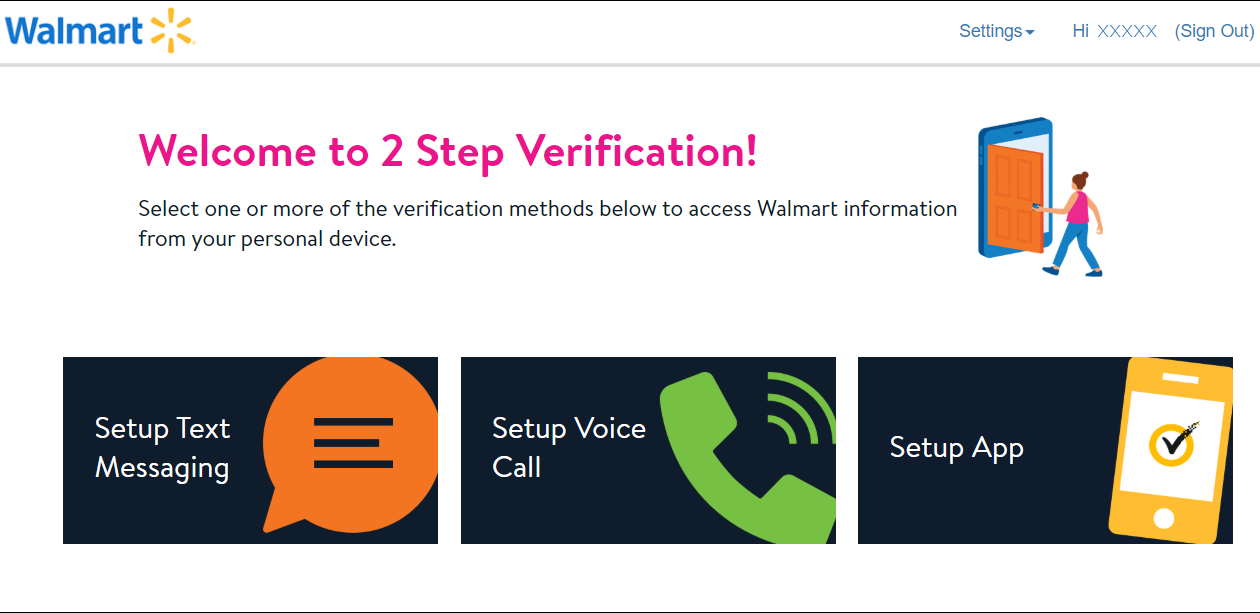
Walmart 2-Step Verification is necessary for you. If you have a Walmart account, it’s important to activate 2-step verification. This security feature adds an extra layer of protection to your account, making it harder for hackers to gain access.
This article will show you how to set up 2-step verification on your Walmart account. We’ll also provide some tips on how to keep your account safe and secure.
Table of Contents
Walmart 2-Step Verification
Walmart is one of the largest and most popular stores in the United States. Millions of people shop at Walmart every day, but not everyone knows about Walmart’s 2-Step Verification process. This article will explain what 2-Step Verification is and why you need it to protect your Walmart account.
What is Walmart Two-Step Verification
Walmart, one of the largest retailers in the world, offers a two-step verification process to secure customer accounts.
This security measure is an additional layer of protection for your account. And should be enabled when you set up your account.

Walmart’s Two-Step Verification is an extra security measure that can be used to protect your account.
When you enable Two-Step Verification, you’ll need to enter a code sent to your phone every time you sign in to your Walmart account.
This code is an extra layer of security that helps to protect your account from unauthorized access.
Why do you need Walmart Two-Step Verification?
Like most people, you probably do all of your shopping at Walmart. It’s convenient, and they have everything you need.
But did you know that you can make your Walmart shopping experience even more convenient by signing up for Walmart’s two-step verification?
This simple process adds an extra layer of security to your account. It only takes a few seconds to set up.
So why not give it a try today? You’ll be glad you did! Walmart’s Two-Step Verification process is important in protecting your account from unauthorized access.
If someone else was able to get access to your account. They could potentially make changes or transactions that you didn’t authorize.
With Two-Step Verification enabled, they would need both your password. The code sent to your phone to access your account. This makes it much more difficult for someone to gain unauthorized access to your Walmart account.
How do I enable Walmart Two-Step Verification
Two-step verification is a security feature that helps protect your account from unauthorized access. This blog post will show you how to enable Two-Step Verification for your Walmart account.
After following the steps in this blog post, you will be able to rest assured that your Walmart account is safe and secure.
Walmart’s Two-Step Verification process is easy to enable. Just follow these steps:
- Go to walmart.com and sign in to your account.
- Click on the “My Account” tab and select the “Security” option.
- Scroll down to the “Two-Step Verification” section and click on the “Enable Two-Step Verification” button.
- Enter your phone number and select your carrier.
- You’ll receive a text message with a code. Enter this code in the “Verification Code” field and click on the “Submit” button.
Once you’ve enabled Walmart’s Two-Step Verification process, you’ll need to enter a code that is sent to your phone every time you sign in to your account.
This code is an extra security layer that helps protect your Walmart account from unauthorized access.
How to set up Walmart 2-Step Verification
This blog post will show you how to set up Walmart 2-Step Verification. This is an important security measure that can help protect your account from unauthorized access.
We will walk you through the steps needed to set up 2-Step verification and explain why it is a valuable tool to have in your security arsenal.
To set up Walmart’s Two-Step Verification, you will first need to create a unique app password. This is a password that you will use to log in to the Walmart app on your phone. To create an app password, visit the Walmart website and sign in to your account.
Once you are logged in, click on the “My Account” tab, and then select “Security.” From there, you will see an option to create an app password.
Enter a password that is easy for you to remember, but hard for others to guess. This password should be different from your regular Walmart login password. Once you have created your app password, write it down and keep it in a safe place.
Now that you have created your app password, it’s time to set up Two-Step Verification. To do this:
- Visit the Walmart website and sign in to your account.
- Once you are logged in, click on the “My Account” tab, and then select “Security.” You will see an option for Two-Step Verification.
- Select this option and follow the instructions to set up Two-Step Verification for your account.
Once you have set up Two-Step Verification, you will be able to login to your Walmart account using your app password and a verification code that will be sent to your phone.
This two-step process adds an extra layer of security to your account, making it more difficult for someone to access your account without your permission.
We hope this blog post has helped you understand how to set up Walmart’s Two-Step Verification. This is an important security measure that can help protect your account from unauthorized access.
If you have any questions about setting up Two-Step Verification or needing help troubleshooting an issue, please contact us for assistance.
How to use Walmart 2-Step Verification in case of an emergency
Walmart, one of the largest retail chains in the United States, provides two-step verification for customers to use in case of an emergency.
This article will explain how to set up this security feature and what to do if it is needed. 2-Step verification adds an extra layer of security to your Walmart account, and it is easy to set up! Read on for instructions.
However, if you ever find yourself in a situation where you can’t access your phone or computer, Walmart has a few options for account recovery.
First, you can try using their online chat feature to speak with customer service. If that doesn’t work, you can always give them a call at (800)Walmart. Finally, if all else fails, you can visit your local store and talk to someone in person.
While it may seem like a lot of effort, setting up Walmart’s Two-Step Verification is well worth it to protect your account – and your hard-earned money. So take the time to do it today! You’ll be glad you did.
Tips for keeping your account safe and secure
No matter what precautions you take, there is always a risk that your account could be compromised. Fortunately, there are steps you can take to minimize the chances of this happening. Here are some tips:
- Use a strong and unique password for your Walmart account. Avoid using easily guessed words or phrases, and make sure to use a different password for each online account you have.
- Enable two-step verification for an extra layer of security. This way, even if someone manages to guess your password, they will still need access to your phone or email account in order to log in.
- Keep an eye on your account activity and report any suspicious activity immediately. Walmart has a team of experts who can help investigate and resolve any security issues.
- Never share your login information with anyone, even if they claim to be from Walmart. Always contact Walmart directly if you have any questions or concerns about your account.
You can help protect yourself and your Walmart account against unauthorized access and theft by following these tips. Stay safe online!
FAQs about Walmart 2-Step Verification
What is Walmart’s two-step verification process
Walmart’s two-step verification process is an additional security measure that helps protect your account from unauthorized access.
This process requires you to provide two pieces of information – usually a password and a code generated by an authentication app on your smartphone – in order to log in to your account.
Why do I need to activate Walmart’s two-step verification
Activating Walmart’s two-step verification is important because it adds an extra layer of security to your account.
Without this feature enabled, anyone who knows your login credentials could potentially gain access to your account and make changes or purchases without your knowledge.
How does the two-step verification process work
After activating the two-step verification feature, you will be prompted to enter your password.
As well as a code generated by an authentication app on your smartphone whenever you try to log in to your Walmart account. Once you have entered both the password and the code, you will be able to access your account as usual.
If I forget my phone or don’t have reception, can I still log in to my Walmart account
Yes, you can still log in to your Walmart account even if you don’t have your phone with you or if you are not able to receive codes via text message.
When prompted for the second step of verification, simply click the “I don’t have my phone” link and follow the instructions.
You will be asked to answer a security question, and once you have done so, you will be able to log in to your account.
What if I don’t want to use two-step verification
If you don’t want to use Walmart’s two-step verification process, you can disable it by logging in to your account and going to the Security Settings page.
From there, you will be able to turn off the two-step verification feature. However, we recommend that you keep this feature enabled in order to help protect your account from unauthorized access.
We hope this FAQ has been helpful! If you have any other questions about Walmart’s two-step verification process, please feel free to contact us.
Conclusion
Overall, setting up two-step verification for your Walmart account is a wise move to help protect your account from unauthorized access.
By taking this extra step, you can help ensure that only you have access to your account – even if someone knows your password.
So if you’re looking for an extra layer of security for your online accounts, be sure to set up two-step verification whenever possible.